
Screenshots


App details
- Version
- 1.0.126
- Size
- 2.68 MB
- Updated
- November 3, 2010
- Requires
- Windows XP
- Language
- English
- License
- Free
- Developer
- r2 Studios
- Category
- Windows OS
SoftPas in:
This product is also available in the following languages:
About Xion Portable
Download Xion Portable – Free Portable Audio Player with Skins
Overview of Xion Portable
Xion Portable is a pocket‑sized, standalone music player that brings the power of a full‑featured audio suite to a single, unzip‑and‑run folder. Unlike traditional desktop media players that require a lengthy installation process and often alter system file associations, Xion Portable lives entirely on the storage device you choose—be it a USB stick, an external SSD, or even a cloud‑synced folder. After you download the zip archive, simply extract it, drop your favorite MP3s, FLACs, OGG files, or internet radio URLs into the dedicated music folder, and hit the “Play” button. The player immediately scans the directory, builds a playlist, and starts streaming. Because the application never writes outside its own folder, you can keep it on a public computer without leaving any trace, making it an excellent choice for travelers, students, and anyone who values privacy.
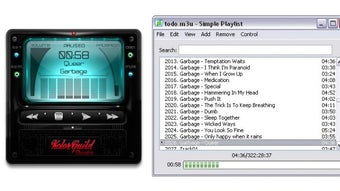
What truly sets Xion Portable apart is its visual customisation. The developer has created a skin engine that requires zero programming knowledge; users can download and apply hundreds of free skins from the official website, changing everything from the colour scheme to button shapes in seconds. With almost 500 skins available, you could theoretically have a fresh look for every day of the year. Beyond aesthetics, the player supports a 10‑band equaliser, a suite of ready‑made presets, and global hotkeys that let you control playback from any active application—perfect for multitasking environments or gaming sessions where you don’t want to switch windows.
Although Xion Portable does not handle video playback, its audio‑only focus results in a lightweight binary that launches in under a second on most modern systems. The inclusion of a separate playlist manager add‑on means you can organise massive libraries without cluttering the main interface. Whether you’re a casual listener who wants a quick way to enjoy a curated mixtape on a friend's PC, or an audiophile seeking a highly customisable, portable solution, Xion Portable delivers a seamless, secure, and visually engaging experience.
Key Features & What Makes Xion Portable Stand Out
- Fully portable – run directly from a USB drive or any folder without installation.
- Zero system impact – no registry edits, no file‑association changes, and no background services.
- Support for virtually all popular audio formats: MP3, FLAC, AAC, OGG, WAV, WMA, and more.
- Integrated internet radio streaming with customizable station lists.
- 10‑band equaliser with preset libraries for rock, jazz, classical, bass‑boost, etc.
- Global hotkeys that work across any active application (play/pause, next, previous, volume).
- Extensive skin library – close to 500 free skins, with an easy‑to‑use skin editor.
- Separate playlist manager add‑on for handling large music collections.
- Lightweight footprint – starts in under a second and uses minimal RAM.
- Free and open‑source – no hidden fees, no ads, and regular community updates.
The skin system deserves a deeper look because it is arguably the most innovative feature in the portable media player market. Each skin is a collection of PNG images and a simple XML descriptor, meaning you can create a new look with a basic graphic editor and a few clicks. The community has responded enthusiastically, contributing themed packs ranging from retro 8‑bit designs to sleek minimalist dark modes. This level of visual customisation not only satisfies aesthetic cravings but also aids accessibility; users can select high‑contrast skins for better readability or larger button layouts for easier navigation on small screens.
From a functional standpoint, the 10‑band equaliser provides granular control over the audio spectrum, allowing listeners to fine‑tune their experience for specific headphones or speaker setups. The presets are thoughtfully curated, but you can also save custom curves for future sessions. Coupled with the global hotkeys—configurable via the settings dialog—you can control playback without ever leaving your current task. This is especially handy for gamers who need to toggle music on and off without pausing their game.
Finally, the inclusion of an internet radio engine expands the player’s utility beyond local files. By importing M3U or PLS playlists, you can stream thousands of stations worldwide, all from within the same lightweight interface. The separate playlist manager add‑on, while optional, offers drag‑and‑drop organisation, bulk tag editing, and sorting by genre, artist, or rating, making large libraries feel manageable even on a portable device.
Installation, Setup, and Everyday Use
Getting Xion Portable up and running is intentionally straightforward. Begin by visiting the official Xion website and clicking the “Download Portable” button. The download size is under 15 MB, reflecting the program’s lean architecture. Once the ZIP archive lands in your downloads folder, right‑click and select “Extract All…” (Windows) or use a native archive utility on macOS or Linux. Choose a destination that you can carry with you—commonly a USB flash drive, an external SSD, or even a cloud‑synced folder like OneDrive or Dropbox.
After extraction, you’ll see a folder containing the executable (Xion.exe for Windows, a cross‑platform binary for macOS/Linux), a “Music” subfolder, a “Skins” directory, and a few configuration files. To add music, simply copy your audio files into the “Music” folder. Xion will automatically index the files the first time you launch the player. If you prefer streaming radio, create a plain‑text file named “stations.m3u” in the root directory and list the URLs of your favourite stations—one per line. The player recognises this file and presents the stations in a dedicated “Radio” tab.
Launching the player is as easy as double‑clicking the executable. The interface greets you with a clean, skin‑aware layout, a playback bar, and the equaliser panel. Use the “Skins” menu to browse the pre‑installed skins or click “Download More Skins” to open the online repository. Selecting a new skin instantly refreshes the UI without requiring a restart. For those who love fine‑tuning, open the “Equaliser” window, choose a preset, or drag the sliders to craft a personal sound profile. Don’t forget to hit “Save Preset” if you want to reuse it later.
Global hotkeys are configured via the “Settings” → “Hotkeys” tab. By default, the space bar toggles play/pause, Ctrl + Right Arrow skips to the next track, and Ctrl + Left Arrow returns to the previous one. You can reassign these shortcuts to avoid conflicts with other software. Once set, the hotkeys work even when Xion is running in the background, letting you control music while you work, browse, or game. Finally, when you’re done, simply close the application. Because Xion never writes outside its folder, there’s nothing left behind on the host computer—perfect for shared or public machines.
Compatibility, Pros & Cons, and Frequently Asked Questions
Operating System Compatibility
- Windows 10, 11 (native .exe)
- macOS 10.13+ (run via Wine or native build if available)
- Linux distributions (Ubuntu, Fedora, Mint) – executable works with standard libraries
- Any OS that can execute a portable binary from a USB drive
Pros
- Zero‑install, truly portable – perfect for USB sticks and public computers.
- Extensive skin library provides limitless visual customisation.
- Supports virtually every audio format and internet radio streams.
- 10‑band equaliser with saveable presets for audiophile‑grade sound tuning.
- Global hotkeys enable seamless control without leaving your active application.
- Free, ad‑free, and regularly updated by an active community.
Cons
- No video playback – strictly audio‑only.
- Playlist management requires a separate add‑on, which may be confusing for beginners.
- Native macOS support is limited; users may need Wine for full functionality.
- Advanced skin creation still needs basic graphic‑editing knowledge.
FAQ – Your Questions Answered
Is Xion Portable completely free or are there hidden costs?
Xion Portable is 100 % free. There are no hidden fees, subscription models, or in‑app purchases. All skins, updates, and add‑ons are provided at no cost by the developer and the community.
Can I run Xion Portable on a Mac without installing additional software?
The native Mac build is limited; most users run the Windows version through Wine, which is a free compatibility layer. This approach works smoothly on macOS 10.13 and later, allowing you to enjoy the full feature set without a formal Windows installation.
How do I add my own custom skin to Xion Portable?
Creating a custom skin is simple: design your images in PNG format, write a short XML descriptor (templates are provided in the “Skins\Template” folder), and place the new folder inside the main “Skins” directory. Xion automatically detects it, and you can select it from the “Skins” menu. No coding experience is required.
Does Xion Portable affect the host computer’s registry or file associations?
No. Xion Portable is completely self‑contained. It never writes to the Windows registry, modifies default program associations, or creates background services. All configuration files stay within the program’s folder, ensuring no trace is left on the host system after you unplug the drive.
Can I use Xion Portable to stream online radio stations?
Yes. Xion includes a built‑in internet radio engine. By adding station URLs to a “stations.m3u” file or using the “Add Radio” dialog, you can browse, favourite, and stream thousands of global radio stations directly from the player.
Final Verdict and Call to Action
In a market saturated with heavyweight media players that demand installation and clutter the system, Xion Portable offers a refreshing alternative. Its combination of true portability, a massive library of skins, robust audio format support, and a powerful equaliser makes it an ideal companion for anyone who wants a sleek, customisable music experience on the go. While the lack of video playback and the need for an extra add‑on for complex playlist management might deter power users, the trade‑off is a lightweight, secure application that leaves no footprint on shared computers.
Overall, Xion Portable earns a solid 4.5 out of 5 stars, reflecting its reliability, user‑friendly design, and vibrant community support. Whether you’re a student hopping between campus labs, a traveler needing a hassle‑free music solution, or a desktop user who simply appreciates a fresh visual style, Xion Portable delivers on its promises. Download it today, experiment with a new skin, and enjoy high‑quality audio wherever you are.
Pros:
- Zero‑install portability.
- Nearly 500 free skins.
- Comprehensive audio format support.
- 10‑band equaliser with presets.
- Global hotkeys for seamless control.
- No video playback.
- Playlist manager is a separate add‑on.
- Mac support requires Wine.
Xion Portable stands out as a lightweight, highly customisable music player that respects user privacy and system integrity. Its skin ecosystem is unmatched in the portable player niche, and the audio features are robust enough for both casual listeners and audiophiles. While it could benefit from native macOS builds and an integrated playlist editor, the overall experience is polished, stable, and fun to use.
Download Xion Portable now and give your music collection a fresh, portable home.
Guides & Tutorials
How to install Xion Portable
- Click the Download button above.
- Once redirected, accept the terms and click Install.
- Wait for the Xion Portable download to finish on your device.
How to use Xion Portable
This software is primarily used for its core features described above. Open the app after installation to explore its capabilities.
User Reviews
No reviews yet. Be the first to share your experience.
You may also like
more
Llama 2
Free-to-use large language model As the new addition to Meta’s arsenal of langua...

NotebookLM
Revolutionizing the note-taking and idea-generation process NotebookLM is an exp...

Github co pilot
AI-inspired software development and coding platform GitHub Copilot is a browser...

Google Gemma
Google’s lightweight AI models Introducing Google Gemma , a family of cutting-ed...

AI Image Enlarger
A free app for Windows, by ai-image-larger. AI Image Enlarger is a free software...

DALL E
AI-driven text-to-image transformation engine DALL·E is a free graphic and desig...